# Usage
## Server
### Start and stop
```sh
olliesrv # start the server (foreground)
# Stop by sending SIGTERM or via the supervisor (e.g. rc-service ollie stop)
```
### TCP listener
To also accept connections over TCP (e.g. for remote access):
```sh
olliesrv -tcp :9564
```
### Debug logging
Log level is controlled by `OLLIE_LOG` (default: `warn`). Set to `debug` for verbose output:
```sh
OLLIE_LOG=debug olliesrv
```
Valid levels: `debug`, `info`, `warn`, `error`.
---
## Security and sandboxing
`toolsrv` applies the configured policy directly through native Landlock in a short-lived child helper; it does not depend on an external sandbox executable. On Linux, the helper creates and restricts a Landlock ruleset before executing the tool. Use `yolo=true` only for explicit development cases where enforcement should be disabled.
## `o` — Terminal CLI
`o` is a multi-call shell script that wraps the 9P namespace into a human-friendly interface.
Installed to `~/.local/bin/o` by `make install-data`.
### Quick start
```sh
o myproj/default new # create session + agent
o myproj/default tui # launch the tmux TUI
```
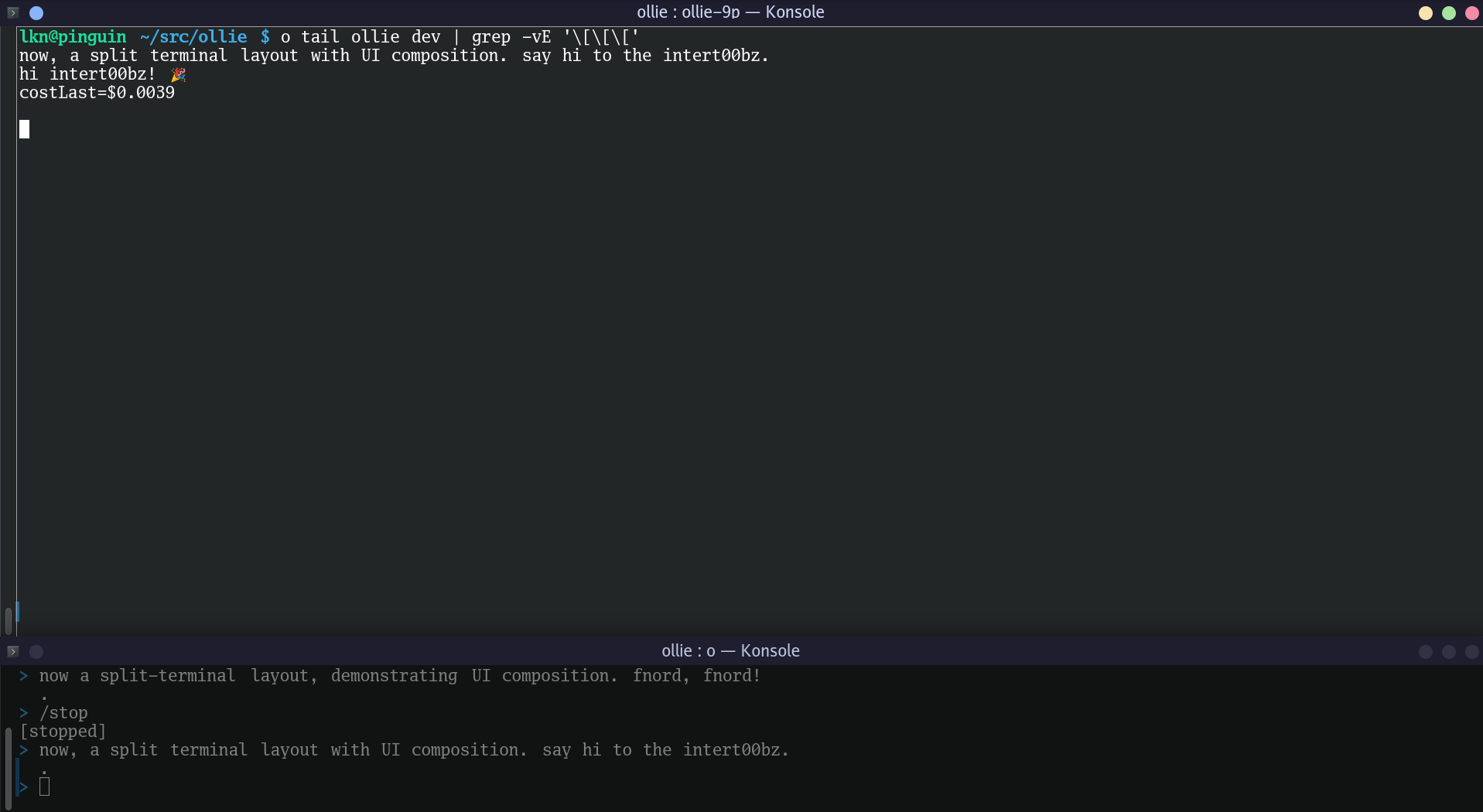
Or without the TUI:
```sh
o myproject/default prompt # interactive prompt REPL (one terminal)
o myproject/default read chat # stream chat output (another terminal)
```
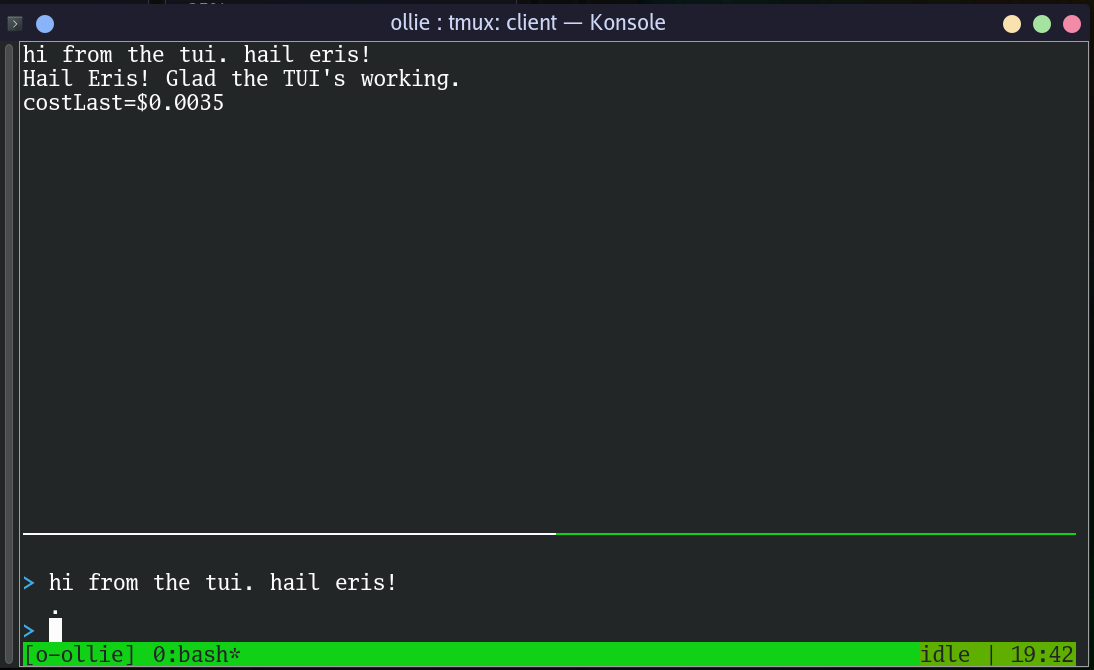
o tui — tmux + shell commands
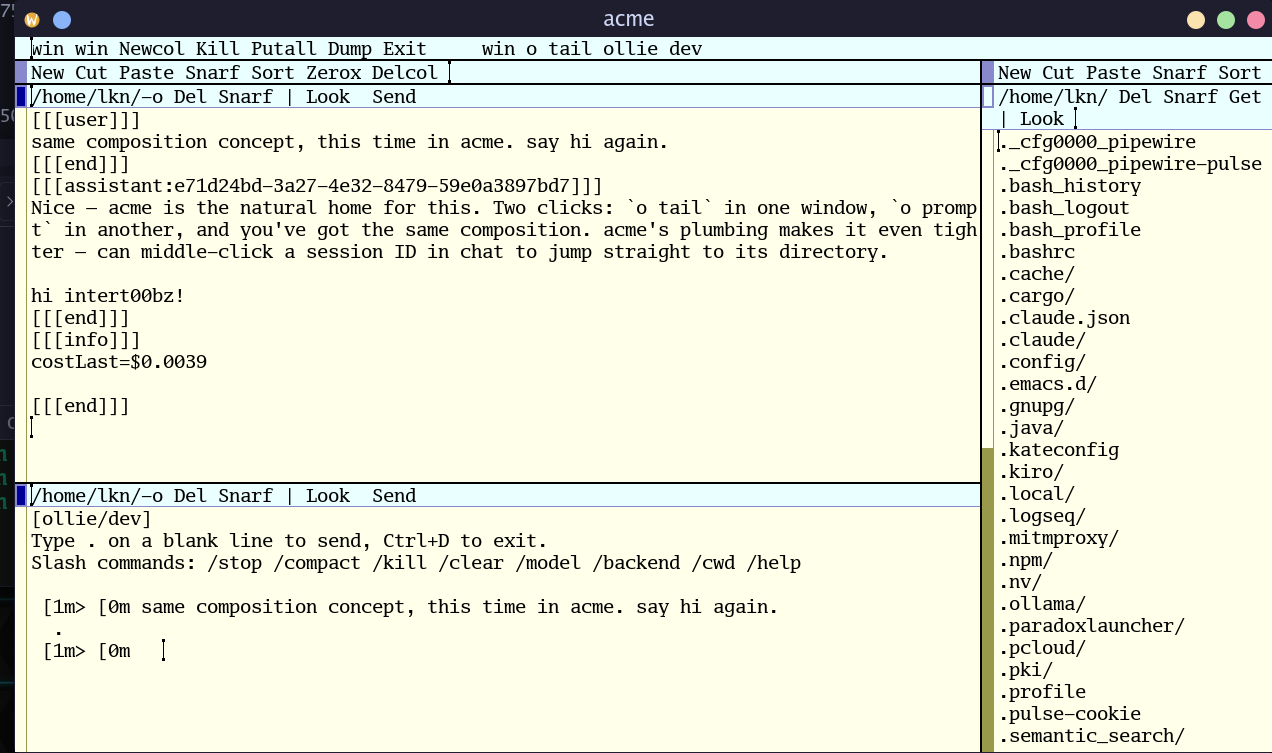
acme — Plan 9 editor
### Context model
Context is determined by the first argument — not by environment variables:
```
o Root level (no context)
o Session level
o / Agent level
o : Agent level (colon separator)
```
The slash in `/` disambiguates session-only from session+agent.
Slash is the primary separator. Agent names may contain colons (e.g., `src:ollie`).
Use colon separator only when session names contain slashes.
`o ls` lists the root of the ollie namespace; `o` with no arguments prints help.
### Commands
| Command | Context | Description |
|---|---|---|
| `o ls` | root | List sessions, models, backends |
| `o generate ` | root | One-shot generation (no session needed) |
| `o / new [cwd]` | agent | Create session (if needed) + agent |
| `o ls` | session | List session contents |
| `o ctl ` | session | Session control |
| `o bypass` | session | Show pending bypass request details |
| `o approve [id]` | session | Approve pending bypass request |
| `o deny [id]` | session | Deny pending bypass request |
| `o / bypass` | agent | Show pending bypass requests for this agent |
| `o / approve [id]` | agent | Approve first pending request for this agent |
| `o / deny [id]` | agent | Deny first pending request for this agent |
| `o / prompt` | agent | Interactive multi-line prompt REPL |
| `o / tui` | agent | Launch tmux TUI |
| `o / ctl ` | agent | Agent control (stop, compact, model, etc.) |
| `o / log [-n N]` | agent | Show last N lines of agent log |
| `o read [-l] ` | any | Read a file (-l: loop) |
| `o write [data]` | any | Write to a file (args or stdin) |
| `o env` | any | Print export statements for current context |
| `o help` | any | Show help |
### Path resolution
When you supply a context, `o` sets a **prefix**:
- Session: `session/`
- Agent: `session//agent/`
Paths given to `read`, `write`, and `ls` are resolved relative to this prefix.
A leading `/` escapes the prefix and addresses the root namespace directly:
| Invocation | Resolves to |
|---|---|
| `o myproj/coding read chat` | `session/myproj/agent/coding/chat` |
| `o myproj/coding read cfg` | `session/myproj/agent/coding/cfg` |
| `o myproj read env` | `session/myproj/env` |
| `o myproj/coding read /models` | `models` (root) |
| `o myproj/coding ls /bypass` | `bypass` (root) |
| `o read models` | `models` (no context, no prefix) |
The leading slash is necessary when you want to access root-level paths
(like `models`, `backends`, `bypass/`) while in session or agent context.
Without it, the path is concatenated with the context prefix.
### Prompt REPL
`o / prompt` is an interactive multi-line REPL:
```
$ o myproj/coding prompt
[myproj/coding]
Type . on a blank line to send, Ctrl+D to exit.
/ prefix runs ctl: /stop, /compact, /model X, /inject X
! prefix: !a approve, !d deny, !b bypass, !q quit
> write a fibonacci function in python
and include a test case
.
```
Type your prompt across multiple lines, then send with `.` on its own line.
Any agent ctl command works as a slash command — the `/` prefix is stripped
and the rest is sent to `ctl`:
| Command | Description |
|---|---|
| `/stop` | Interrupt running agent |
| `/compact` | Compact context window |
| `/clear` | Clear history |
| `/kill` | Kill the agent |
| `/model [X]` | Show or switch model |
| `/models` | List available models |
| `/backend` | Show current backend |
| `/agent [X]` | Show or switch agent profile |
| `/name [X]` | Show or set agent display name |
| `/cwd [X]` | Show or change working directory |
| `/inject X` | Inject text into context (alias: `/i`) |
| `/tools` | List loaded tools |
| `/tool_load X` | Load a tool |
| `/tool_unload X` | Unload a tool |
| `/peeradd X` | Add a bidirectional peer link |
| `/peerdel X` | Remove a bidirectional peer link |
| `/peers` | List current peers |
| `!a` | Approve first pending bypass request for this agent |
| `!d` | Deny first pending bypass request for this agent |
| `!b` | List pending bypass requests for this agent |
| `!q` | Kill the tmux TUI session and exit |
Piped input is also supported:
```sh
echo "explain this error" | o myproj/coding prompt
cat file.go | o myproj/coding write prompt
```
### One-shot generation
No session or agent needed — `o generate` sends a prompt and returns a response:
```sh
o generate "explain monads in one sentence"
cat error.log | o generate # pipe content as the prompt
echo "write a haiku about filesystems" | o generate | wc -w
```
---
## `o tui` — tmux Terminal UI
`o / tui` composes `o read chat` and `o prompt` into a single
tmux layout — two shell commands in two panes, with agent state in the tmux
status bar:
### Usage
```sh
o myproj/coding tui
```
1. Creates a tmux session named `o--` (special chars replaced with `-`).
2. Two panes:
- **Pane 0** (top, 80%): streams chat output (log tail + live `read chat`).
- **Pane 1** (bottom, 20%): `o prompt` — multi-line REPL (`/` prefix runs ctl commands).
3. A background process subscribes to the agent's state events via `echo "session.{s}.agent.{a}.state" | ollie-9p rdwrs event` and updates the tmux status bar on each state transition.
4. Focuses the prompt pane and attaches.
No polling. Each read blocks until data arrives. The status bar updates on every
state transition via the event stream — zero CPU when idle.
### tmux tips
- `Ctrl+b ;` — toggle between last two panes (fast prompt ↔ tail switch)
- `Ctrl+b z` — zoom any pane to full screen
- `Ctrl+b [` — scroll mode (arrow keys, `q` to exit)
- `Ctrl+b d` — detach (session keeps running, reattach with `tmux attach -t o-`)
---
## `o env` — Context export
`o env` prints export statements for the current context. This is useful for
other tools (raw `ollie-9p` commands, scripts) that need to know which session
and agent are being addressed:
```sh
eval $(o myproj/coding env)
# exports OLLIE_SESSION=myproj OLLIE_AGENT=coding
ollie-9p read session/$OLLIE_SESSION/agent/$OLLIE_AGENT/stats
```
Note: `o` itself does not read these environment variables — it determines
context purely from its positional arguments.
---
## Other front-ends
- **Session clients** — shell, KDE, and other 9P clients
- **[KDE](architecture-kde.md)** — plasmoid, standalone GUI, Kate plugin, KRunner
- **acme** — Plan 9 editor (scripts in `data/scripts/acme/`)
For technical details on the raw 9P filesystem, see [`doc/architecture-9p.md`](architecture-9p.md).
For tool architecture and authoring, see [`architecture-tools.md`](architecture-tools.md).