 d799603587
|
||
|---|---|---|
| docs | ||
| src | ||
| .gitignore | ||
| 99-deft.sh.in | ||
| AGENTS.md | ||
| CMakeLists.txt | ||
| README.md | ||
README.md
Deft
Deft is my attempt to turn Kate into a daily driver
I actually want to use. I live in Plan 9's acme most
of the time, but I like a lot of what Kate offers — and I don't like
menu-driven workflows. So this is a
suite of Kate / KTextEditor plugins that pulls in ideas from the tools I reach
for — acme, sam, and the plumber from Plan 9; M-x from Emacs; a Sublime-style
fuzzy palette; and the radial/pie menus that video games have used for years to
put actions a flick away from the cursor — and bends Kate toward them.
The deeper reason is ergonomic: I've moved to typing one-handed, and that reshapes everything. A workflow built on two-handed chords and reaching across the keyboard simply doesn't work anymore. The mouse does the reaching, the keyboard stays under one hand, and no action is allowed to require a chord or an F-key. This isn't a preference knob — it's the constraint the whole design is built around.
The aim is a text editor driven by the mouse at the cursor and by plain-letter keyboard input — never by hunting through nested menubars or memorizing complex chords.
Design constraints
These are hard constraints that shape every decision:
- Mouse-heavy. The fastest input is the mouse, used locally at the caret (radial / floating surfaces, in the spirit of a game's weapon wheel), not a trek to the menubar.
- One-handed typing (the driving constraint). Input must work comfortably with a single hand. This is not a convenience toggle; it is why the mouse carries the reaching and why chords are off the table.
- No complex chords. Single modifier at most (
Ctrl+letter). No leader-key chord trees, no multi-cursor keybinds. - Compact keyboard. F-keys and nav clusters live on a layer toggle, so they carry extra cognitive cost and are avoided as primary triggers.
- Emacs/Sublime fluency.
M-x(Alt+x) is comfortable and welcome as a primary keyboard entry point, as is a Sublime-style type-to-filter palette.
Unifying principle
One action registry. Three doors onto it:
M-x(keyboard), a radial caret menu (mouse), and the:command line (optional). No action requires an F-key or a chord.
Why not just use Kate's command bar?
Kate's KCommandBar is a sealed widget: it accepts a list of actions via
setActions() and exposes no hook to customize its matcher. Its matcher,
KFuzzyMatcher, is single-needle, strictly in-order subsequence, with no typo
tolerance — by KDE's own documentation, "gti" will not match "git". There
is no "orderless" (space-separated tokens in any order) and no company-style
live completion.
So the project replaces the palette rather than extending it, built on a custom
matcher (FuzzyRanker).
Environment
- Kate 25.12.3, KDE Frameworks 6, Qt 6
- C++20, CMake, extra-cmake-modules
- C++ is the only first-class plugin path on this install (no Python/Pâté binding present)
Build
cmake -B build -S .
cmake --build build
QT_QPA_PLATFORM=offscreen ./build/bin/test_fuzzyranker   # run the matcher tests
ctest --test-dir build                                   # or via ctest
Install the plugins into Kate
Deft is one .so per feature, not a monolith. The build produces six
KTextEditor plugins under build/bin/kf6/ktexteditor/:
| Plugin file | Display name | Feature |
|---|---|---|
deft_palette.so |
[deft:util] palette |
Command palette (Alt+X / M-x) over every window action + the :-verbs + the switchers, frecency-ranked |
deft_switch.so |
[deft:util] switch |
Project Go to File (Alt+P) and Go to Symbol (Alt+G) |
deft_radial.so |
[deft:util] radial |
Radial caret menu (Alt+R / right-mouse) |
deft_acme.so |
[deft:nineify] acme |
Acme editing gestures (line keys, pair selection, mouse chords) |
deft_sam.so |
[deft:nineify] sam |
sam-style structural regular expressions |
deft_plumb.so |
[deft:nineify] plumb |
Plan 9 plumber (open under cursor) |
Drop whichever features you want where Kate scans for KTextEditor plugins. The
simplest way is cmake --install, which already targets the right place:
cmake --install build
By default this installs into your home directory, not system-wide. The
build sets CMAKE_INSTALL_PREFIX to ~/.local when you don't pass one (these
are personal plugins, so installing them under /usr/local — the stock CMake
default — would need root and is the wrong place), and it points the plugin
install dir at Qt's own plugin path. So the plugins land at:
~/.local/lib/<arch>/qt6/plugins/kf6/ktexteditor/deft_*.so
which is exactly the directory Kate scans (QT_PLUGIN_PATH). To install
system-wide instead, pass an explicit prefix (and expect to need root):
cmake --install build --prefix /usr
Making Kate find a user-local install
Qt only loads plugins from directories on QT_PLUGIN_PATH, and that does
not include ~/.local by default — so after a home-directory install Kate
will not list the plugins until that path is on the search list. This is a
one-time, per-user setup step.
The install automates it for you: when the prefix is inside your home, it
writes a login snippet to
~/.config/plasma-workspace/env/99-deft.sh that adds the plugin directory to
QT_PLUGIN_PATH. Plasma sources it at login, so after the next log out / log
in Kate finds the plugins. To use them in the current session without
logging out, run the export the installer prints, e.g.:
export QT_PLUGIN_PATH="$HOME/.local/lib/x86_64-linux-gnu/qt6/plugins:$QT_PLUGIN_PATH"
(For a non-Plasma session, put that same line in your shell profile. For a system-prefix install this step is unnecessary; the installer prints the ready snippet under the build dir if you still want it.)
Then in Kate: Settings → Configure Kate → Plugins → enable each [deft:…]
plugin you installed. See The plugins below for what each one
does and how to drive it.
The plugins cooperate but do not depend on one another: palette's "Go to
File/Symbol" entries and radial's launcher slices resolve switch's actions by
object name at runtime, so each .so works on its own and simply gains those
entry points when its sibling is also enabled.
The plugins
Each plugin is independent — enable only what you want. Keys shown below are the defaults.
⚠️ These plugins are opinionated. They are built around one person's workflow (mouse-at-the-caret, one-handed typing, no chords, Plan 9 / Emacs habits), and several reshape or suppress Kate's defaults rather than just adding features:
radialhijacks the right mouse button in the editor, suppressing the normal context menu while enabled.acmerebindsCtrl+A/E/H/U/W, repurposes double-click, turns left-button mouse chords into Cut/Paste, and kills X11 middle-click primary paste.paletteandswitchclaimAlt+X/P/G;plumbclaimsF2.This is deliberate, not a bug. If you want a conventional Kate, don't enable the ones whose gestures you aren't ready for — try them one at a time.
[deft:util] palette — command palette (M-x)
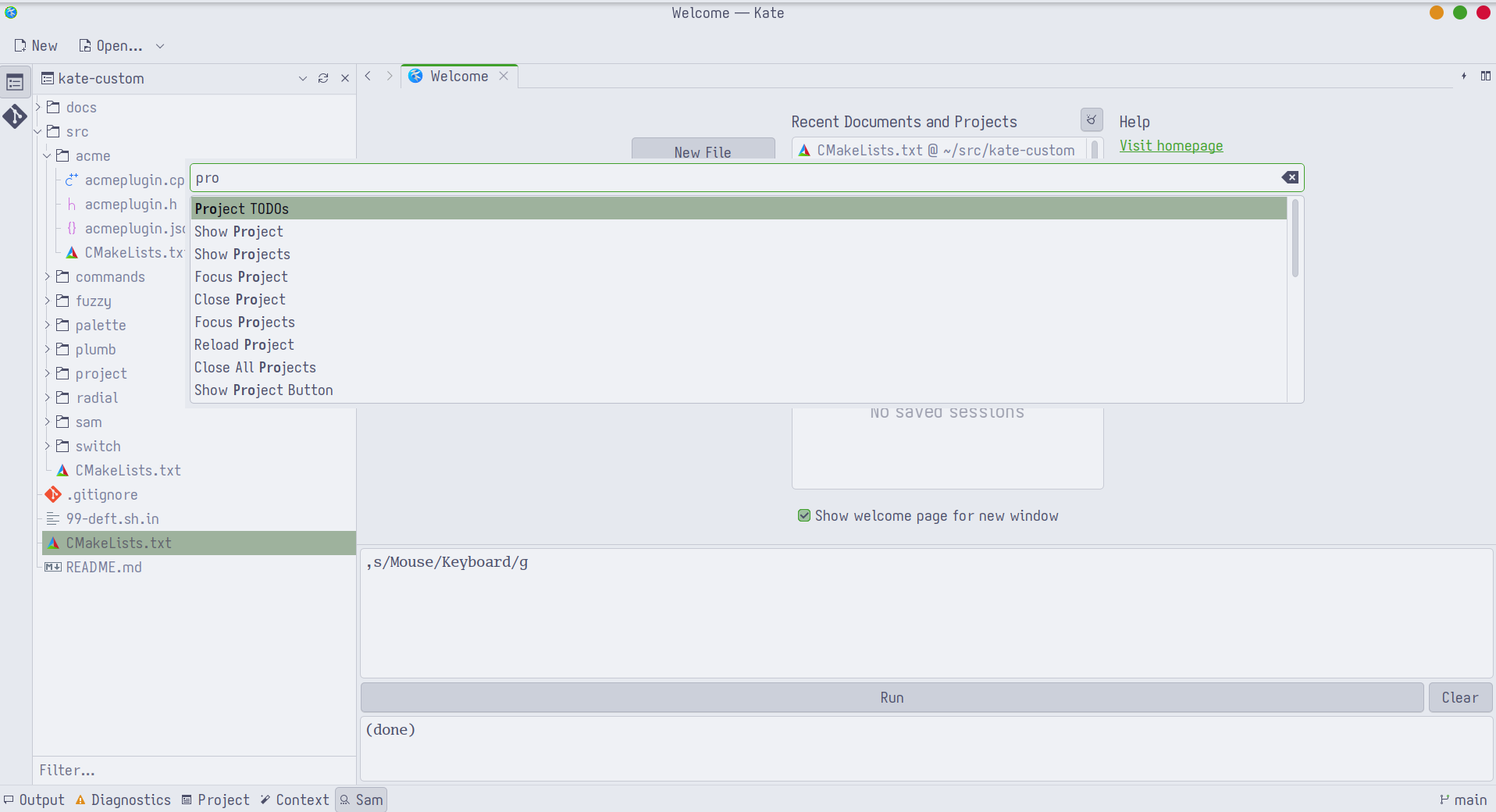
A Sublime/Emacs-style launcher over every action currently offered by the
window, matched with the orderless FuzzyRanker (space-separated tokens in
any order, with typo tolerance) and ranked by frecency (frequency + recency of
your past choices).
- Open:
Alt+X. Type to filter,Enteror click to run,Escto dismiss. - Entries include all live menu/toolbar actions, the
:-verbs below, and — whenswitchis enabled — Go to File and Go to Symbol. - Usage is remembered in
~/.config/deft/palette.frecency.json.
It also registers a small pack of : command-line verbs (type : in Kate,
or pick them from the palette). Each transforms the selection in place, or the
whole document when nothing is selected:
| Verb | Effect |
|---|---|
osort [u] [i] |
sort selected lines (u = unique, i = case-insensitive) |
rsort |
reverse the order of selected lines |
case <style> |
recase: upper / lower / title / snake / camel / kebab |
b64enc / b64dec |
Base64 encode / decode |
rot13 |
ROT13 |
uuid |
insert a random UUID at the cursor |
pipe <shell> |
replace the selection with the output of sh -c <shell> (selection on stdin) |
sortis registered asosortbecause Kate already ships a built-insort; the KTextEditor registry drops a whole command object if any one name collides.
[deft:util] switch — project file & symbol switchers
Jump within the active project without the file tree. The project scope is Kate's loaded project when present (via the Project plugin), otherwise it is discovered from the active document (VCS root, else its directory).
- Go to File —
Alt+P. Fuzzy-match the full project-relative path (files come from VCS/discovery).Enter/click opens. - Go to Symbol —
Alt+G. Fuzzy-match symbols indexed with ctags (requiresctagsonPATH); jumps to the definition. - The index is built asynchronously and cached; the palette opens instantly and fills in (showing "Indexing…" on a cold project). It is invalidated when Kate switches projects.
- Rankings are remembered in
~/.config/deft/switch.frecency.json.
[deft:util] radial — radial caret menu (mouse)
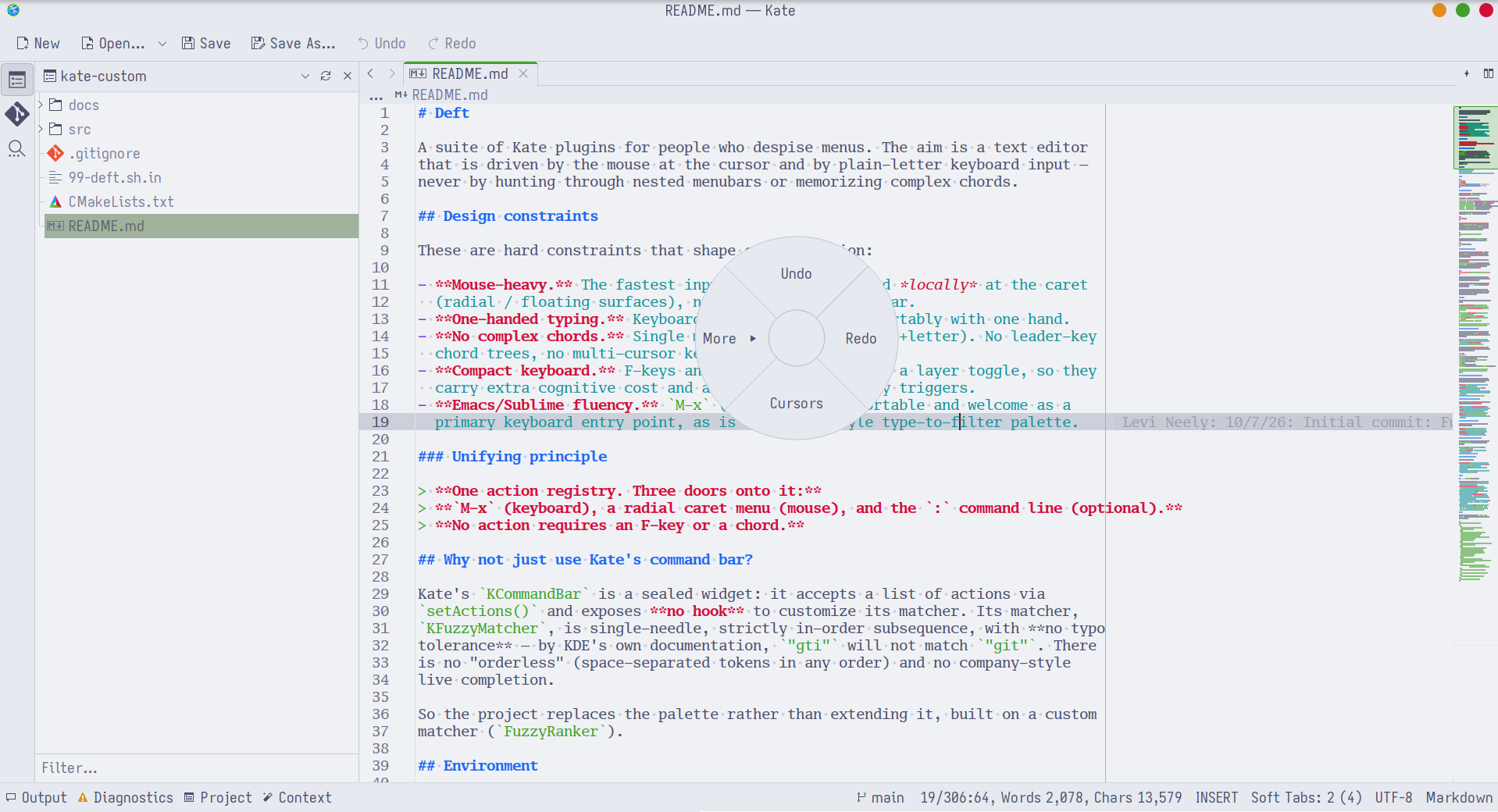
A multi-level pie menu for actions that complete in place (cut, copy, paste, comment, case changes…), so the mouse stays at the text. The model is the weapon/emote wheel from games: a quick flick toward a direction, not a hunt through a list.
- Open:
Alt+R(at the caret) or press the right mouse button in the editor (at the pointer; the normal context menu is suppressed while enabled). - Choose: move toward a slice and release, or click it. A branch slice (marked ▸) opens a submenu; the centre hub goes back / cancels.
- Slices can trigger any action by name, including
palette/switchdoors. - Configure: drop a
radials.jsonat~/.config/deft/radials.jsonto replace the built-in tree; when it is absent, empty, or invalid, the built-in default is used. See docs/radials.example.json for the format.
[deft:nineify] acme — acme editing gestures

Plan 9 acme muscle memory inside Kate. Installed as a filter so it never clashes with Kate's own bindings.
- Line keys:
Ctrl+Abeginning of line,Ctrl+Eend of line,Ctrl+Herase char,Ctrl+Uerase to line start,Ctrl+Werase previous word. - Double-click inside a bracket/quote pair selects the enclosed text.
- Mouse chords (hold left, tap the other): left+middle = Cut, left+right = Paste. X11 middle-click primary-paste is suppressed.
[deft:nineify] sam — structural regular expressions
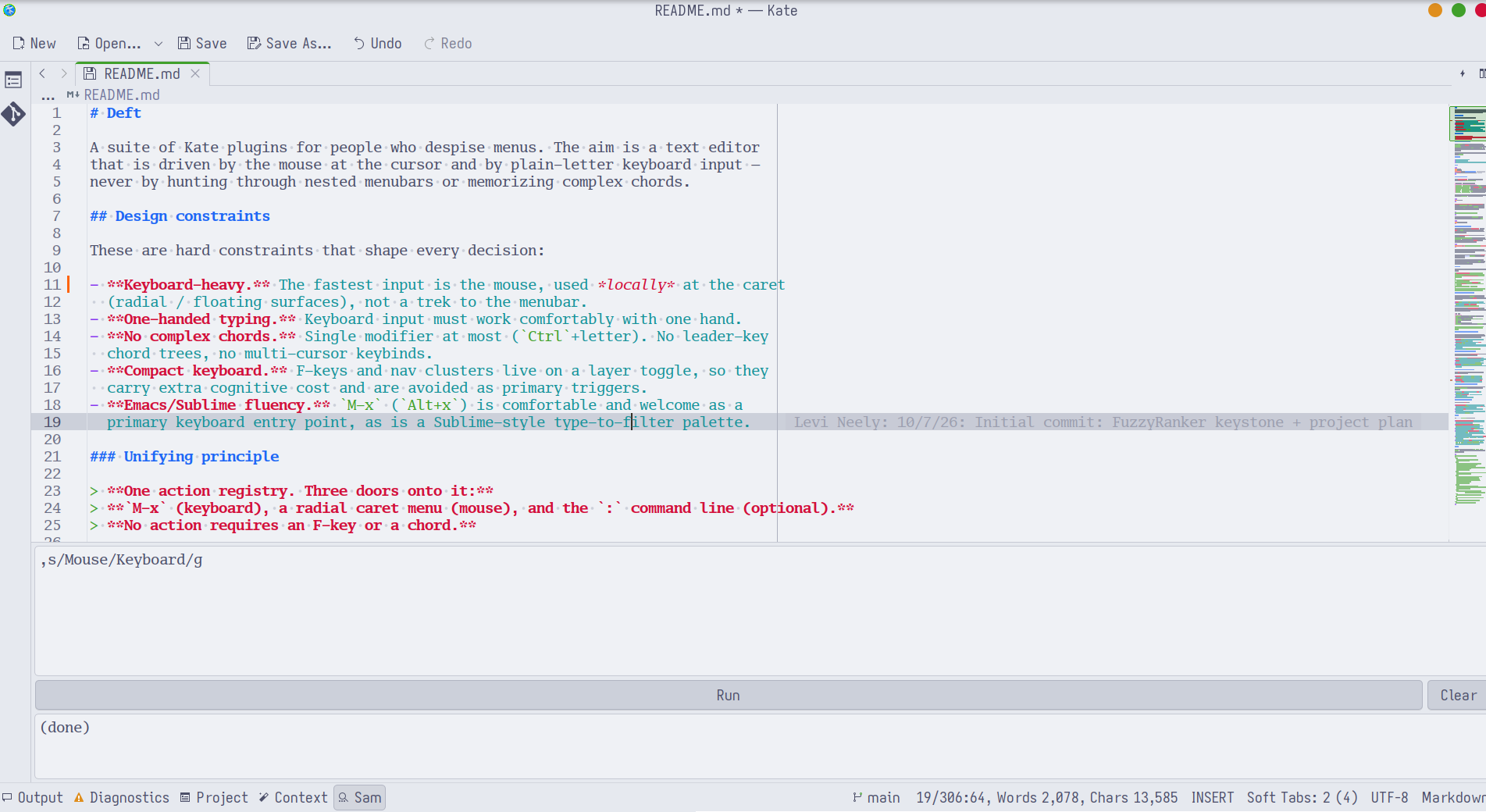
Run Plan 9 sam structural-regexp programs against your text — the expressive
x/re/, g/re/, s/re/txt/, , dot-addressing model, not line-at-a-time
find/replace.
- Opens a dockable Sam tool view: a program editor, a Run button
(
Ctrl+Return), and an output log. - Runs against the active document, or across open buffers with the
multi-file
X/Yloop commands. - Edits are applied in a single undo transaction.
[deft:nineify] plumb — Plan 9 plumber

Make Kate a first-class plumb client.
- Plumb under the caret:
F2. Sends the file-path token under the cursor (or the selection, sofoo.cpp:42works) through the plumber's send port, resolved relative to the active document's directory. - Kate also holds the edit port open, so files/addresses plumbed from elsewhere open here.
- If no plumber is running, it falls back to opening the target directly (URLs
via the system handler,
path[:line]in Kate).
Layout
Shared building blocks are static libraries (fuzzy, palette, project,
commands, …); each feature is a self-contained KTextEditor plugin that links
the libraries it needs.
CMakeLists.txt            top-level KF6/Qt6/ECM project
src/
  fuzzy/
    fuzzyranker.{h,cpp}   orderless + layered fuzzy matcher
    test_fuzzyranker.cpp  QTest suite
  palette/
    palettemodel.{h,cpp}  ranked, filterable list model (headless)
    palettewidget.{h,cpp} frameless command-palette popup
    frecencystore.{h,cpp} persisted frecency ranking
    paletteplugin.{h,cpp} [deft:util] palette — M-x, :-verbs, switcher doors
    paletteplugin.json    plugin metadata
    test_*.cpp            QTest suites
  switch/
    switchplugin.{h,cpp}  [deft:util] switch — Go to File (Alt+P) / Symbol (Alt+G)
    switchplugin.json     plugin metadata
  radial/
    radialmodel.{h,cpp}   radial tree + hit-test geometry (headless)
    radialmenu.{h,cpp}    frameless multi-level radial widget
    radialconfig.{h,cpp}  JSON → radial tree + built-in default
    radialplugin.{h,cpp}  [deft:util] radial — caret menu plugin
    radialplugin.json     plugin metadata
    test_*.cpp            QTest suites
  commands/
    texttransforms.{h,cpp}  pure text transforms (headless)
    deftcommands.{h,cpp}    ":"-verb KTextEditor::Command pack (used by palette)
    test_*.cpp              QTest suites
  project/
    projectindex / symbolindex / projectindexer / kateprojectbridge
                          async, cached file & symbol index (used by switch)
  acme/
    acmeplugin.{h,cpp,json} [deft:nineify] acme — editing gestures
  sam/
    sam* + samplugin.{h,cpp,json} [deft:nineify] sam — structural regexps
  plumb/
    plumb* + plumbplugin  [deft:nineify] plumb — Plan 9 plumber
docs/
  PLUMBING.md             configuring the Plan 9 plumber for Kate
  SAM.md                  the sam structural-regexp dialect
  radials.example.json    example radial-menu config
  img/                    screenshots used in this README
For contributing or working on the code, see AGENTS.md.